1 Introduction to Python
1.1 Key Ideas
- Python
- IDE
- Environment
- Code
1.2 What is Python?
Python is a high-level, interpreted programming language created by Guido van Rossum and released in 1991. It emphasises readability and simplicity, making it an excellent choice for beginners.
Key features of Python include:
- Easy to Learn: Simple, clear syntax that’s readable even for newcomers
- Versatile: Used in web development, data science, AI, automation, and more
- Large Community: Extensive libraries and active support community
- Cross-Platform: Runs on Windows, macOS, Linux, and other platforms
- Free and Open Source: Available for everyone to use and modify
Language Trend
- Python isn’t just the #1 programming language on the TIOBE Index; it’s a gateway to creating the future, with its record-breaking rise and a historic 18% ranking this August proving it’s here to lead the way.
- Whether you dream of building AI breakthroughs, solving real-world problems, or simply starting your journey in programming, Python’s magical blend of simplicity and power welcomes everyone—from curious students to visionary creators.
- Dive into Python, and you’re not just learning a language—you’re unlocking a world of endless possibilities, where your code can bring dreams to life and shape the world of tomorrow.
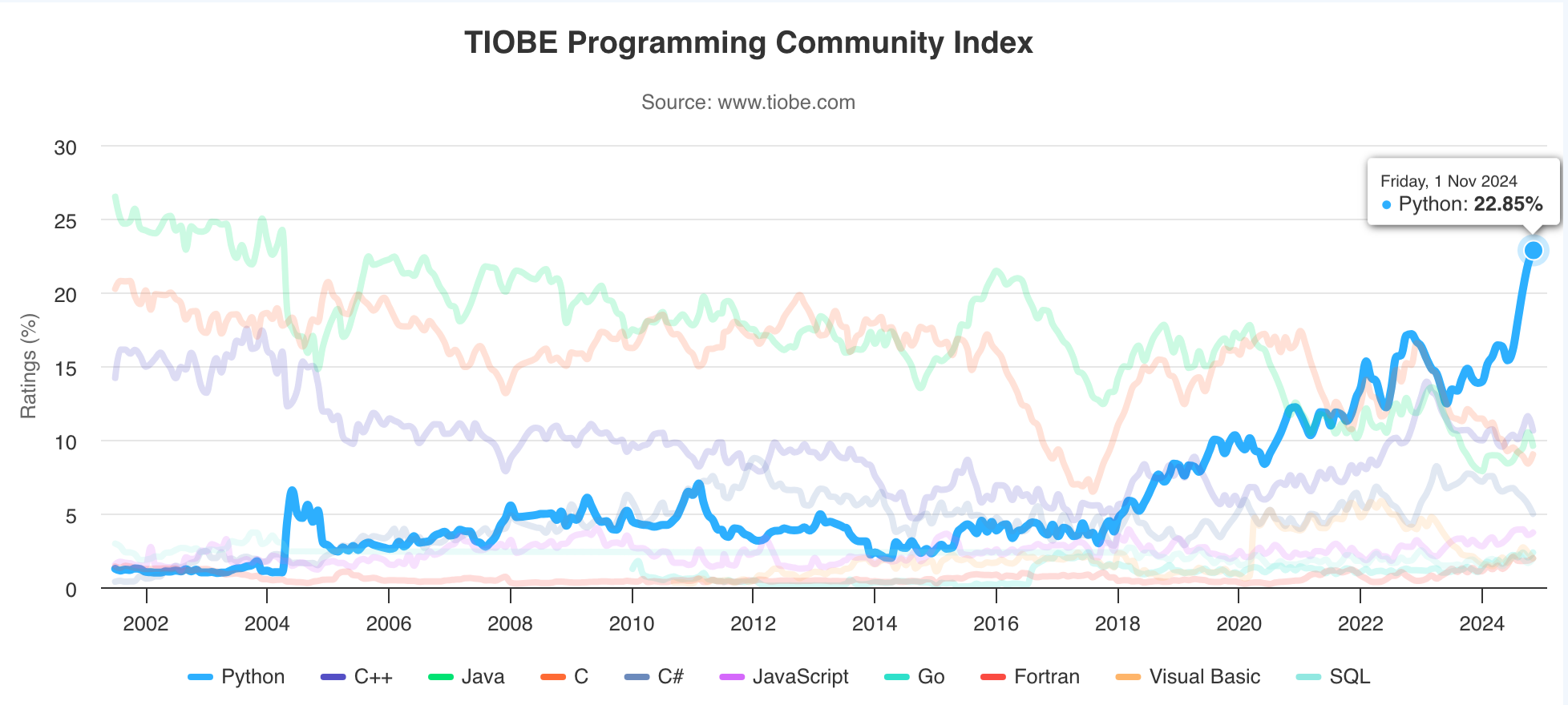
Source: TIOBE index
What programming languages do you know?
1.3 Setting Up Your Environment
To start programming in Python, you’ll need to set up your development environment:
- Installing Python
- Download Python from python.org
- Choose the appropriate version for your system
- Follow the installation wizard
- Verify installation with
python --version
- Choosing an Editor
- Visual Studio Code (desktop)
- Jupyter Notebooks (web-based)
- Environment Setup
- Setting up PATH variables
- Installing pip (package manager)
- Creating virtual environments
1.4 Your First Program: “Hello, World!”
Let’s write our first Python program:
Understanding the components:
- Comments start with #
- print() is a built-in function
- Text strings use quotation marks
- Statements end with a newline
1.6 AI in Software Development
- How AI tools can assist in programming
1.  Have you used AI tools like ChatGPT for learning other subjects?
2.  What was the most helpful feature of these tools?
3.  What challenges did you face when using them?
4.  How do you verify that AI-generated suggestions are correct?
5.  How can AI help in software development?
1.7 Exercise: Getting Comfortable with Python
Smoke Testing: A Quick Check for Your Code
Smoke testing is a simple way to check if your program works. It’s like starting a car for the first time—you don’t drive it far, you just check if the engine starts and the lights turn on.
Why the Name “Smoke Testing”?
The term originates from hardware testing: turning on a device for the first time to see if it “smokes” (indicating a failure). In software, it metaphorically checks if the software “burns out” when performing basic operations.
Example: Testing “Hello, World!”
- Verify that your IDE can run Python code successfully.
- Ensure “Hello, World!” is displayed on the screen exactly as written.
1.8 Mini-Project: “Hello World”
Part 1: Hello, World!
print("Hello, World!")Your first step into programming - run this code!
Part 2: Mental Health and Wellbeing Game
A Game Development Project Based on Australian STEM Video Game Challenge
Working in pairs, you’ll develop a game focused on mental health and wellbeing. This project combines game development with a meaningful purpose: creating an interactive resource for our school’s Student/Staff/Parent Portal. Your game will help users explore their personal journey with mental health through engaging gameplay and supportive interactions. Ready to start your coding journey? Let’s begin with this simple “Hello, World!” programme!
Over the next 10 lessons, you’ll embark on a comprehensive game development journey while learning Python programming. Starting with project planning and collaborating with our school counsellor, you’ll move through creative phases of game design, including narrative development, gameplay mechanics, and visual and audio elements. You’ll learn to prototype your ideas, implement them in code, and refine your game through testing and feedback. The journey is structured in three phases: Planning (weeks 1-2), Designing (weeks 3-7), and Reflection (weeks 8-10), culminating in the submission of your game to the Australian STEM Video Game Challenge. Your game will not only showcase your programming skills but also serve as a valuable resource for our school community’s mental health and wellbeing.