flowchart TD
A[Start] --> B[Get Player Name]
B --> C[Display Welcome Message]
C --> D[Initialise Score = 0]
D --> E[Display Game Instructions]
E --> F[End]
3 Control Structures
3.1 Program Flow and Sequence
In programming, control structures determine how your code executes. Before writing code, it’s helpful to visualise the flow using flowcharts.
Flow chart
Simple Sequence
# Simple sequence in Python
player_name = input("Enter your name: ")
print(f"Welcome, {player_name}!")
score = 0
print("Use arrow keys to move, Space to jump")
The simplest flow is a sequence of steps, one after another:
Game Loop Structure
Most games follow a loop with decisions:
lives = 3
score = 0

while lives > 0:
    player_move = get_input()
    if is_correct_move(player_move):
        score += 10
    else:
        lives -= 1

print(f"Game Over! Final score: {score}")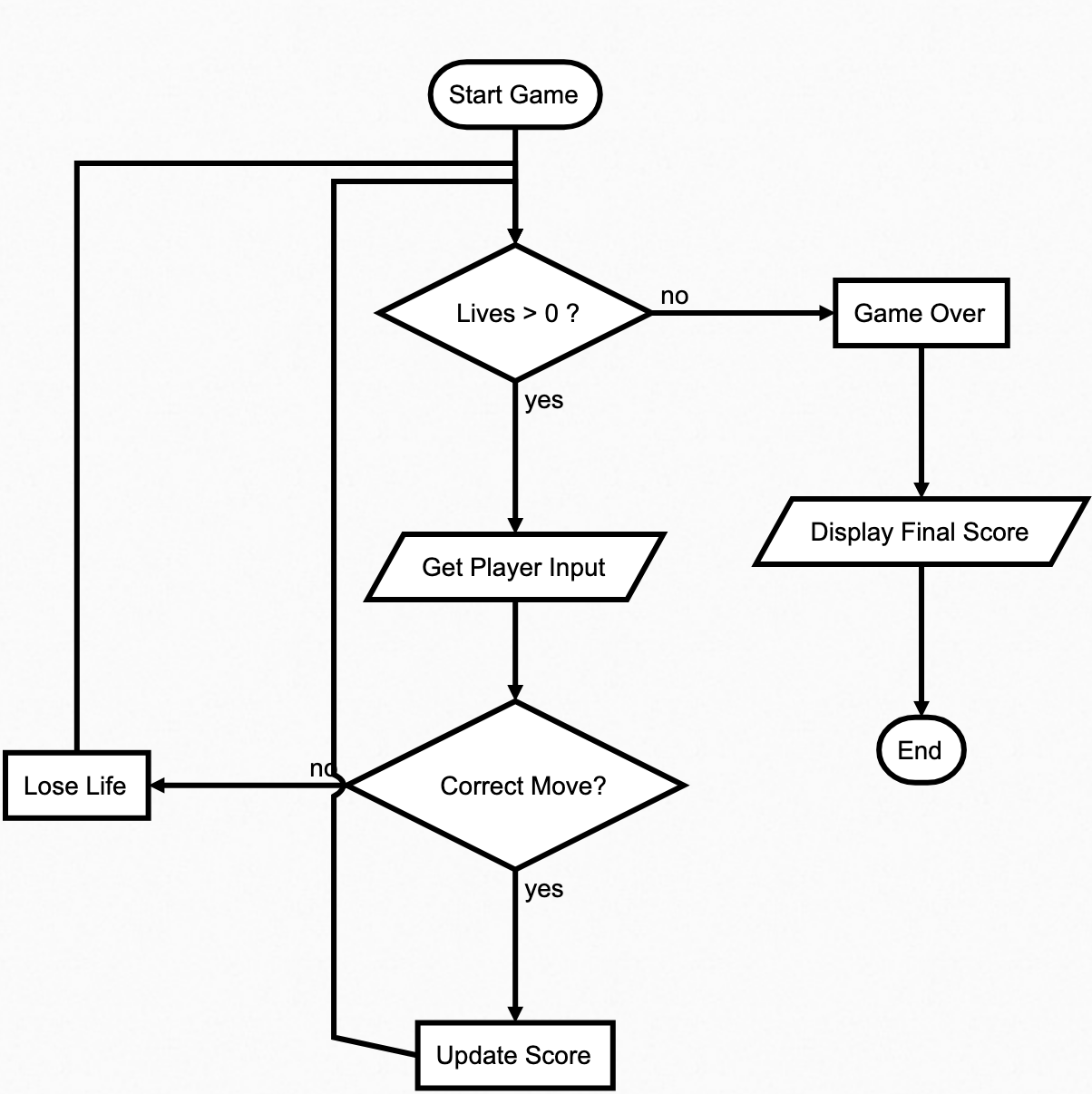
Key Points:
- Programmes execute from top to bottom
- Flowcharts help plan your code structure
- Diamonds show where programme can take different paths
- Arrows always show the next step
- Loops connect back to earlier steps
Tips for Using Flowcharts
- Start simple and add details later
- Use flowcharts to find logic errors
- Think about all possible paths
- Keep it clear and readable
3.2 Logical Operators
- AND, OR, NOT
- With comparison operators
- Truth tables
Logical operators help us combine and manipulate boolean conditions. In Python, the main operators are and, or, and not.
Basic Logical Operators
AND Operator
All conditions must be True for the result to be True.
Example:
# Check if the player can use a special power
has_power = True
enough_energy = True
# True only if both are True
can_use_special = has_power and enough_energy
OR Operator
At least one condition must be True for the result to be True.
Example:
# Check if the player should lose a life
hit_by_enemy = False
fell_in_trap = True
# True if either is True
lose_life = hit_by_enemy or fell_in_trap
NOT Operator
Reverses the boolean value (True becomes False, and vice versa).
Example:
# Check if the game is still running
game_over = False
# True because game_over is False
game_running = not game_over
Why use NOT? - The not operator is useful when you want to perform actions based on the absence of a condition.
Combining Logical and Comparison Operators
Logical operators often combine with comparison operators to evaluate multiple conditions.
Example:
score = 85
lives = 3
power_level = 50

# Check multiple conditions

# Winning if score is high and lives remain
is_winning = score > 80 and lives > 0
# Level up if either condition is met
can_level_up = score >= 100 or power_level >= 75
# Game is not over if lives are greater than 0
is_not_game_over = not (lives <= 0)
Quick Practice
- Write a condition to check if a player can pick up a reward only if they have space in their inventory and the reward is within reach.
- Modify the
is_winningcondition to include a check forpower_level > 40.
Truth Tables
| A | B | A AND B |
|---|---|---|
| True | True | True |
| True | False | False |
| False | True | False |
| False | False | False |
| A | B | A OR B |
|---|---|---|
| True | True | True |
| True | False | True |
| False | True | True |
| False | False | False |
| A | NOT A |
|---|---|
| True | False |
| False | True |
Common Game Examples
#  Player can proceed to next level
score = 95
has_key = True
can_proceed = score >= 90 and has_key

#  Player needs healing
health = 30
has_shield = False
needs_healing = health < 50 or not has_shield

#  Game state checks
is_invulnerable = True
can_take_damage = not is_invulnerable
Writing Complex Conditions Clearly
When dealing with complex conditions, it’s essential to use parentheses, break them into smaller parts, and consider the order of operations. Here’s an example:
Scenario
A player can unlock a treasure chest if: - They have the correct key or they know the secret code. - The chest is not locked by magic. - Their inventory has enough space for the treasure.
Code Example
Tips for Using Logical Operators
- Use parentheses to make complex conditions clear
- Break long conditions into smaller parts
- Think about the order of operations
- Test all possible combinations
Remember
and: True only if both conditions are Trueor: True if at least one condition is Truenot: Reverses True/False
3.3 Selection and Conditional Statements
ifstatements- Chained conditionals
elifandelsestatements - Nested conditions
- Match/case (switch/case)
Simple if Statements
Conditional statements allow your program to make decisions and take different actions based on conditions.
if with else
The if-else structure provides two possible paths for your code to follow. If the condition after the if statement is True, the code block under it executes. If not, the code block under else runs.
Chained Conditionals (elif)
Chained conditionals allow you to evaluate multiple conditions sequentially. Use elif (short for “else if”) to specify additional conditions to check if the previous ones are not True.
Nested Conditions
Nested conditions occur when one if statement is placed inside another. This structure is useful for handling more complex scenarios where decisions depend on multiple levels of conditions.
In this example:
- Outer Condition: The program first checks if the player has a key (
has_key):- If
True, it proceeds to the next condition. - If
False, it skips all inner checks and prints"Find the key!".
- If
- Middle Condition: If the player has a key, the program then checks if they also have a weapon (
has_weapon):- If
True, it proceeds to the innermost condition. - If
False, it stops further checks and prints"Need a weapon first!".
- If
- Inner Condition: If both the key and weapon conditions are
True, the program checks if an enemy is present (enemy_present):- If
True, it prints"Fight to enter!". - If
False, it prints"Safe to enter!".
- If
This approach ensures the program only evaluates deeper conditions if the outer ones are satisfied, avoiding unnecessary checks.
Match/Case Statements
The match statement, introduced in Python 3.10, provides a clean way to handle multiple patterns in a more readable manner. It’s particularly useful for situations where you want to compare a single value against multiple cases or match patterns.
Key Features
- Match One Value: A single value is evaluated, and the matching
caseblock is executed. - Default Case: Use the underscore
_as a default case for unmatched conditions. - Pattern Matching: Cases can use literals, variables, or more complex patterns.
A cleaner way to handle multiple conditions:
Let’s convert the nested conditional above into a match/case structure:
Advanced Match/Case Examples
The match/case statement can handle structured data, like tuples, and provide cleaner solutions for complex decision-making. In this example, the program evaluates the game_state tuple and executes different actions based on its values.
Try different game_state yourself.
Combining Conditions
Logical operators allow you to combine multiple conditions into a single statement, making your code cleaner and more efficient.
Best Practices
- Keep conditions simple and clear.
- Use
elifinstead of nestedifstatements when possible. - Consider
match/casefor multiple conditions. - Think about all possible scenarios to avoid missing edge cases.
Common Mistakes
Avoid Nested Conditions
# DON'T: Nested conditions that are hard to follow
if score > 50:
    if lives > 0:
        if has_weapon:
            if not game_over:
                print("Playing...")
Combine Conditions Logically
# DO: Combine conditions logically
can_play = score > 50 and lives > 0 and has_weapon and not game_over
# Use descriptive variables to clarify intent
if can_play:
    print("Playing...")
Key Takeaways
- Start with simple conditions and build up logically.
- Use
eliffor handling multiple related checks. - Opt for
match/caseto handle structured data or multiple options more cleanly. - Always prioritise readability and maintainability when nesting or combining conditions.
3.4 Iteration and Loops
forloopswhileloops- Loop control statements
- Nested loops
- Other loops not in Python
for Loops
for loops are used when you know how many times you want to repeat something, or when you want to iterate over a collection of items.
Basic For Loop
Using range
The range function is a powerful tool in for loops that generates a sequence of numbers. It can take up to three parameters: start, stop, and step.
Generates numbers starting from 0 up to, but not including, the stop value.
Generates numbers starting from start up to, but not including, the stop value.
Generates numbers starting from start up to stop (not including), increasing by step.
Generates numbers starting from start down to stop (not including), decreasing by step.
while Loops
while loops are used when the number of repetitions depends on a condition being met, rather than being predetermined.
Loop Control Statements
Loop control statements modify the flow of loops, allowing you to exit or skip iterations based on conditions.
breakcontinueelse
break - Exit the loop immediately
The break statement stops the loop entirely and moves execution to the first statement after the loop.
#  Exit when player dies
while True:
    if health <= 0:
        print("Game Over")
        break
    health -= 10
continue - Skip to next iteration
The continue statement skips the rest of the current loop iteration and proceeds to the next one.
#  Skip inactive players
for player in players:
    if not player.is_active:
        continue
    player.update_score()
else in Loops
The else block after a loop executes only if the loop completes normally, meaning it doesn’t encounter a break.
#  Check if player found the key
for room in dungeon:
    if room.has_key:
        print("Key found!")
        break
else:
    print("Key not found in any room")
Nested Loops
Nested loops occur when one loop runs inside another. These are commonly used for tasks like iterating over grids, matrices, or nested data structures.
Example
Loops Not in Python
Some programming languages offer additional loop constructs that are not directly available in Python. Here’s how to understand and replicate them in Python:
Python avoids adding unnecessary loop constructs, relying on the flexibility of its for and while loops to handle all use cases.
do-while Loop (Not in Python)
The do-while loop ensures that the loop body executes at least once before checking the condition.
# do-while (not in Python)
# do {
#     action();
# } while (condition);

# Python equivalent:
while True:
    action()
    if not condition:
        break
repeat-until Loop (Not in Python)
The repeat-until loop is similar to a do-while loop but exits when the condition becomes true.
# repeat-until (not in Python)
# repeat {
#     action();
# } until (condition);

# Python equivalent:
while True:
    action()
    if condition:
        break
Loop Choice Guide
- Use
forwhen you know the number of iterations - Use
whilewhen you need a condition to stop - Use
breakfor early exit - Use
continueto skip iterations
Common Pitfalls
- Infinite loops (forgetting to update condition)
- Off-by-one errors in ranges
Remember:
- Keep loops simple and focused
- Use clear exit conditions
- Consider performance with nested loops
- Choose the right type of loop for your task
3.6 Exercise: Building Logic
- Exercises using conditionals and loops
- Write a flawed loop and utilise an AI tool to debug it
- Testing control flow implementations
3.7 Mini-Project: Guess the Number Game
- Create a game using random number generation
- Implement user input validation
- Use loops for repeated guesses
- Apply conditional statements for game logic